Category: EDCI 337

Final portfolio – EDCI 337

This course pushed me to think differently about how people learn through media. Looking back, every weekly assignment built on the last one, and I walked away with a much clearer sense of how design, storytelling, and technology all connect in education. Here’s how I met each learning outcome.


Contextualize how learning informs interactive and multimedia experiences

One of the biggest takeaways from this course was understanding that multimedia isn’t just about making things look nice, but it’s about how people actually process information. Through my multimedia story draft and the final multimedia story, I learned to think about the learner first. What are they seeing? What are they hearing? How do those two things work together? Planning a walk through a local park as a multimedia experience forced me to think about how the environment itself becomes a learning context, and how combining audio, visuals, and narration creates something better than any single format alone.


Apply multimedia design principles in planning your educational resources

Mayer’s multimedia learning principles were honestly the hardest part of this course for me to wrap my head around at first. Terms like modality, contiguity, and coherence felt new until I actually had to apply them to my own work. Once I started planning my multimedia story, things clicked. I realized contiguity means putting related words and images close together in time, and coherence means cutting anything that doesn’t add to the message. I also applied these principles in my data visualization post, where I matched each dataset to the chart type that best communicated its story, rather than just picking whatever looked cool.


Engage in design thinking to create multimedia learning projects

Design thinking showed up most clearly in how I approached the Daily Creates each week. I was making choices about format, tone, and what would actually communicate something meaningful. In my image week post, I learned that adding even a simple text overlay or audio layer to a photo changes how it lands for the viewer. That’s a design decision. In my video week post, I had to think about pacing, framing, and what to include versus what to cut.


Apply storytelling principles in creating effective learning opportunities

Storytelling was something I thought I understood before this course, but applying it to educational content made it more intentional. My multimedia story follows a clear beginning, a journey through the park, and a moment of reflection at the end. That structure wasn’t an accident. I learned that good educational content needs a narrative spine; it’s just information with no reason to care. My text week post also pushed me to tell answers to creative prompts from TDC, which was a way to practice building a narrative quickly.


Describe and apply principles of effective interactive multimedia design

This outcome came together across the whole course, but it really clicked during the later weeks. Effective multimedia design means the format serves the content, not the other way around. In my audio week post, I learned that sound alone can carry a lot of meaning, but it works best when paired with context. In my data visualization post, I applied this by using bar charts for comparisons and a line chart for trends over time. Each choice was intentional and based on what would be clearest for someone seeing the data for the first time.


6. Generate a variety of prototype artifacts, including comics, videos, and web pages

Across the course, I created a range of artifacts, including written pieces, audio recordings, images with layered media, and videos. My video week post was probably the most challenging to produce because video editing was new to me, and getting the pacing right took a few tries. My image week post taught me how to layer simple elements onto a photo to add meaning, something that sounds basic but actually took some trial and error to get right.


7. Use GenAI appropriately as a tool to support creative activities

I used Claude throughout this course as a brainstorming tool. When I was stuck on how to frame a reflection or wasn’t sure how a Mayer principle connected to something I made, I’d talk it through with Claude to get unstuck. The ideas and the artifacts were mine, but having an AI to bounce things off of made the process faster and less frustrating. I think that’s what appropriate GenAI use looks like —it supports the thinking without replacing it. I made all the creative decisions, did all the recording and filming, and wrote the final versions of everything. Claude helped me get there.


Challenges I Faced

This course had a learning curve. Mayer’s principles were the hardest thing for me to internalize. I kept reading the definitions, but they didn’t feel real until I was actually planning a multimedia project and had to justify every design choice. Video editing was also a new territory. Getting footage, trimming it, and making it feel nice took way longer than I thought it would. And something as simple as adding audio or text to an image turned out to be trickier than expected. Figuring out the right tools and getting the output to look clean took real trial and error.


How This Applies to My Future

I’m studying computer science at UVic with a focus on AI and machine learning, and I’m planning to build systems that people actually interact with. This course made me think about the human side of that work in a way that pure CS coursework doesn’t always cover. If I’m building an AI tool or an educational platform, understanding how people process information, what makes content accessible, and how storytelling makes ideas stick. The principles I learned here aren’t just for education majors. They apply to any product or system designed for people to use and learn from. I’ll carry that with me into every project I work on.


References

EDCI 337 – Week 6: Data Visualization Week

This week I stepped away from the TDC prompts and visualized three things from my own life. No external research, just data I already knew.


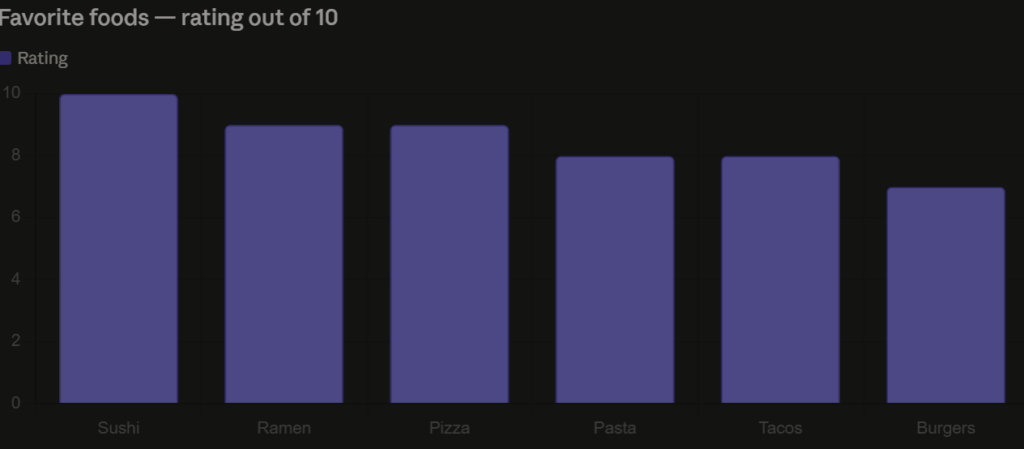
Favorite Foods — Rated Out of 10

I rated six of my favorite foods on a scale of 1 to 10. Sushi takes the top spot, no surprise there. Ramen and pizza tie for second. Simple bar chart, easy to read at a glance.


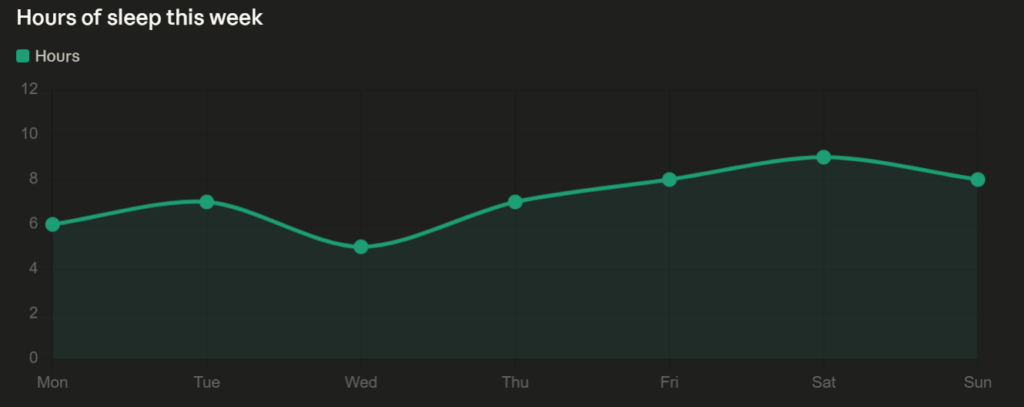
Sleep This Week

I tracked how many hours I slept each night from Monday to Sunday. Wednesday was rough at 5 hours, Saturday was the best at 9. The line chart makes the pattern obvious in a way a list of numbers wouldn’t.


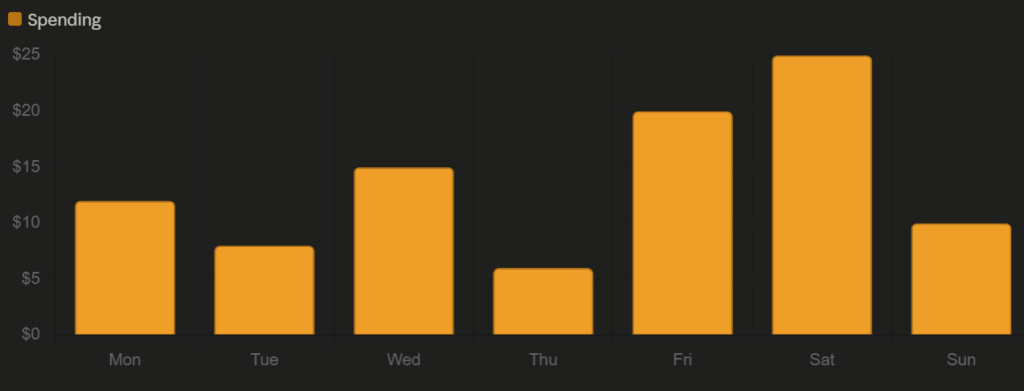
Daily food & coffee spending ($)


Reflection

Data visualization is its own form of multimedia. Each chart this week combined numbers, color, and spatial layout to communicate something faster than text alone could. That’s Mayer’s multimedia learning theory in practice — the visual channel and the verbal channel working together to reduce cognitive load.

Accessibility showed up in my chart choices. Bar and line charts are among the most universally readable formats.

Design thinking came into the selection process. Each dataset got a different chart type because each one told a different kind of story. Trends over time go to a line chart. Comparisons between categories go to a bar chart. The format should serve the data, not the other way around.

Active learning happened in the making. Deciding what to visualize, picking the right format, and thinking about what each chart actually communicates is a different kind of thinking than just reading about data viz in a textbook.

And storytelling is what ties all three together. A week of sleep, spending, and food preferences sounds boring as a list. As charts, it becomes a small portrait of a week in my life.

EDCI 337 Daily Create Multimedia

This week, I chose to step away from the DS106 Daily Creates and document three things from my own life, each one a multimedia artifact in its own right.


A Phone and a Dial Tone

I paired a photo of a phone with a dial tone audio clip. Simple combination, but it works — the sound adds a layer the image alone can’t capture.


FBLA State Business Competition — 2nd Place

I placed second at FBLA State in high school. To go with the photo, I added a winning sound — because a still image doesn’t quite capture what that moment felt like.


A Wardrobe I Built

I built a wardrobe and filmed the finished product — a walkthrough of the exterior and interior. Seeing it complete on video hits differently than a photo would.


Reflection

This week felt different because I chose the content myself. Each piece came from my actual life, not a prompt, which made the multimedia learning theory connections feel more natural. Combining audio, image, and video in one post is exactly what Mayer’s principles describe — using multiple channels to make meaning stick.

From an accessibility standpoint, pairing visuals with audio and written context means someone can engage with this post regardless of how they best process information.

Design thinking showed up in how I framed each item — not just “here’s a thing” but why it matters. The wardrobe and the FBLA result both required iteration and problem-solving to get there.

Active learning happened in the doing. Building something physical and competing at a high level are both forms of learning that no classroom replicates.

Multimedia Story – A Walk Through Miners Corner Park – EDCI 337

Arriving

For my final multimedia story, I headed out to Miners Corner Park on a walk to spend some real time outside, slow down, and actually pay attention to what was around me. What started as a class assignment ended up being a genuinely good afternoon.


The Broken Tree

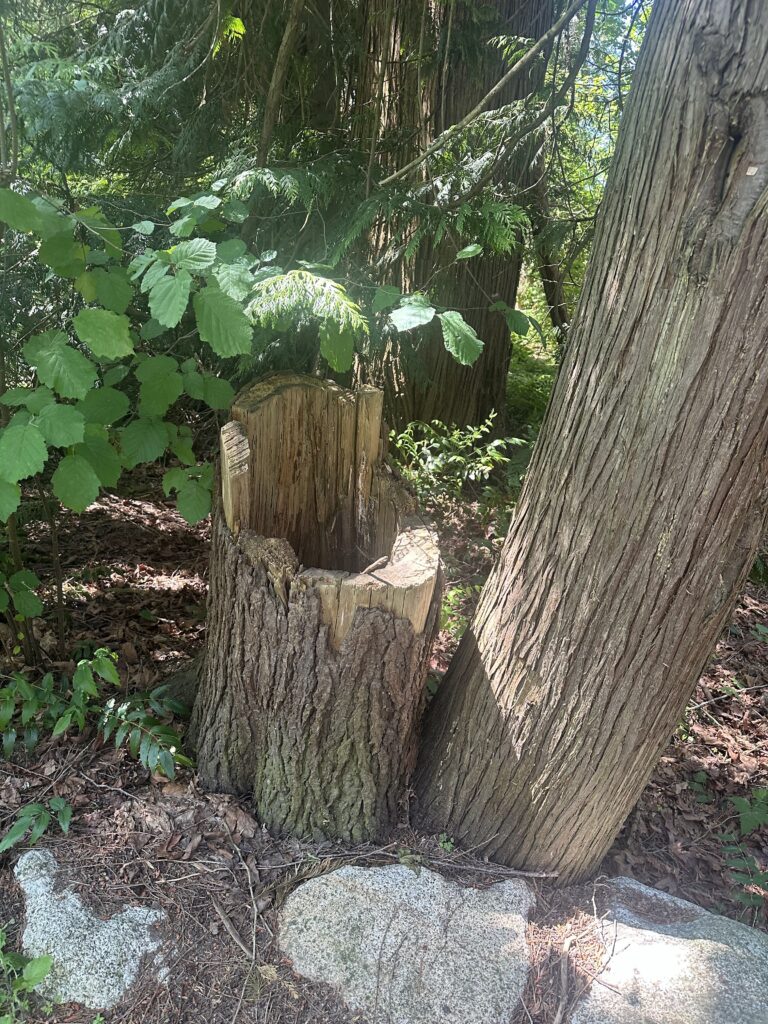
A little way in, I spotted a small broken tree right off the path. Something about it stood out to me. It is not dramatic or unusual, but it made me stop. Nature does not always look pristine, and I think there is something worth noticing about that.


The Walking Trail

This was my favourite part of the walk. The trail winds through some really nice greenery, and in the video, I talk about how peaceful it feels just walking through it. No traffic, no noise, just the path ahead. It is the kind of place that makes you wonder why you do not go outside more often.


The Trees

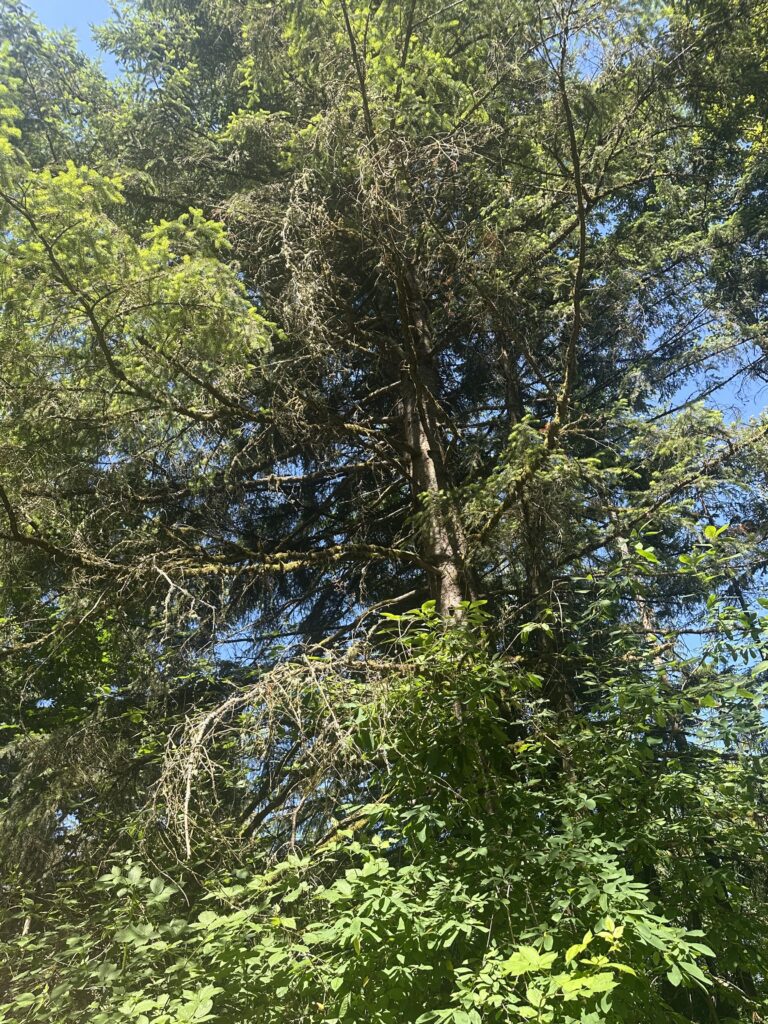
Further down, I stopped to photograph one of the bigger trees. Looking up through the canopy with the sun cutting through the leaves is one of those things that looks even better in person than in a photo. But the photo still does the job.


The Wildflowers

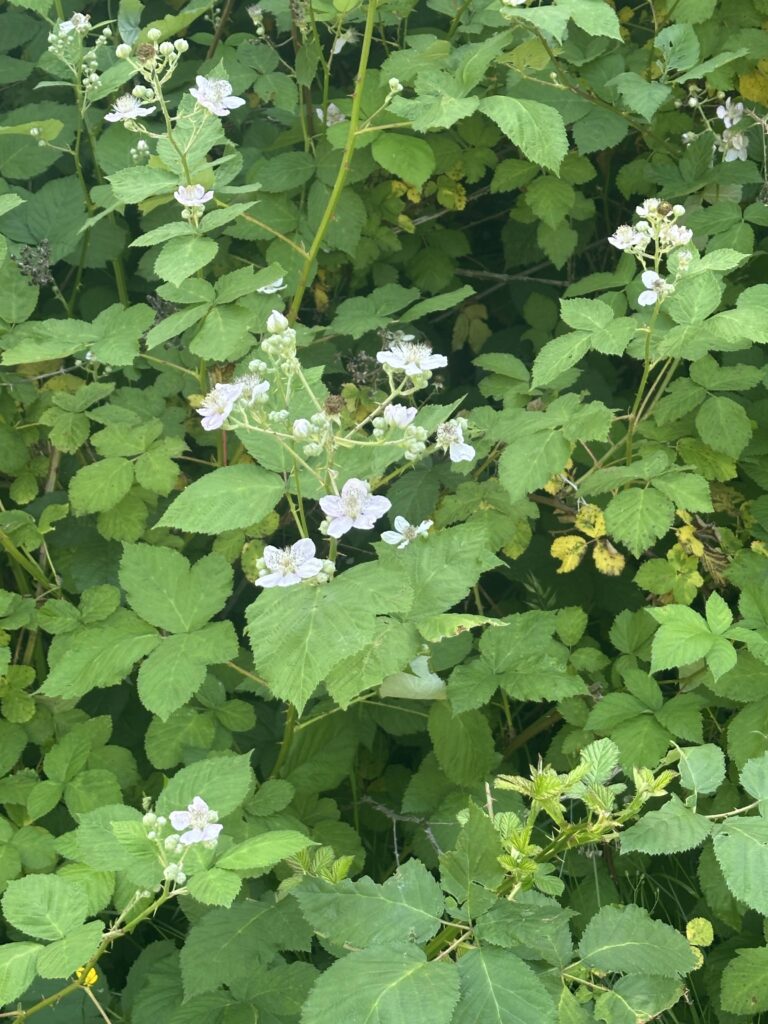
Right near the trail edge, there was a small cluster of white wildflowers growing through the green. Easy to miss if you are moving fast. I almost did.


The Basketball Court

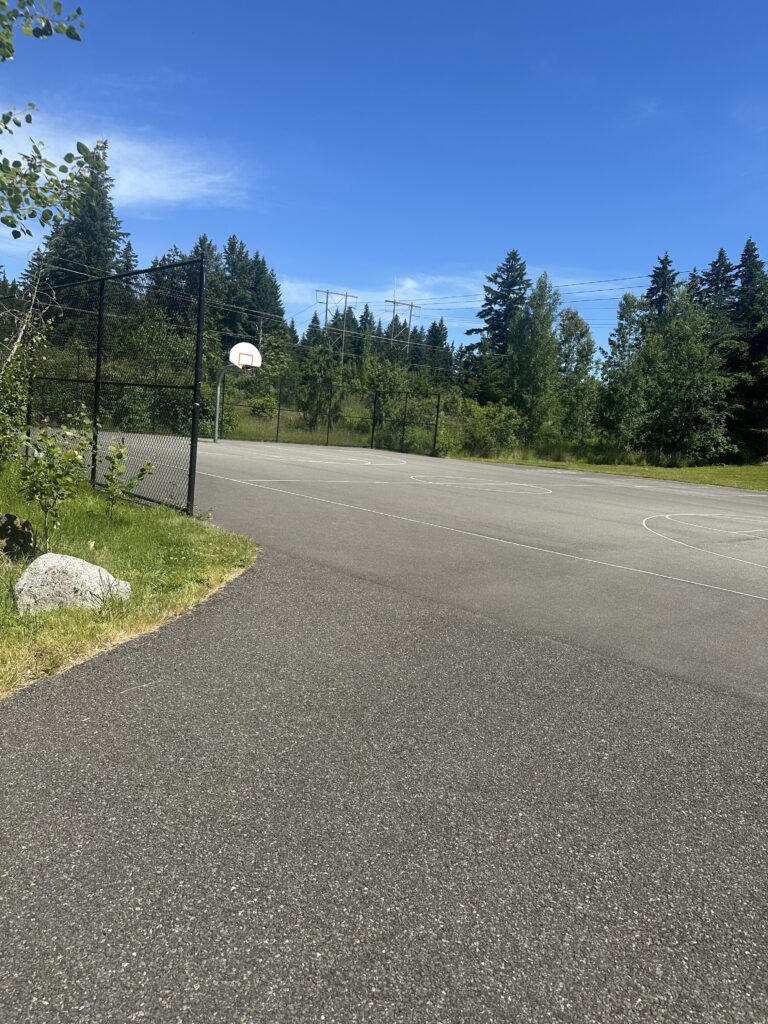
I did not expect to end up playing basketball, but here we are. There were a few people already on the court, and it just kind of happened. Honestly, one of the highlights of the whole afternoon. It added a social energy to the trip that the quieter parts of the trail did not have.


The Pond

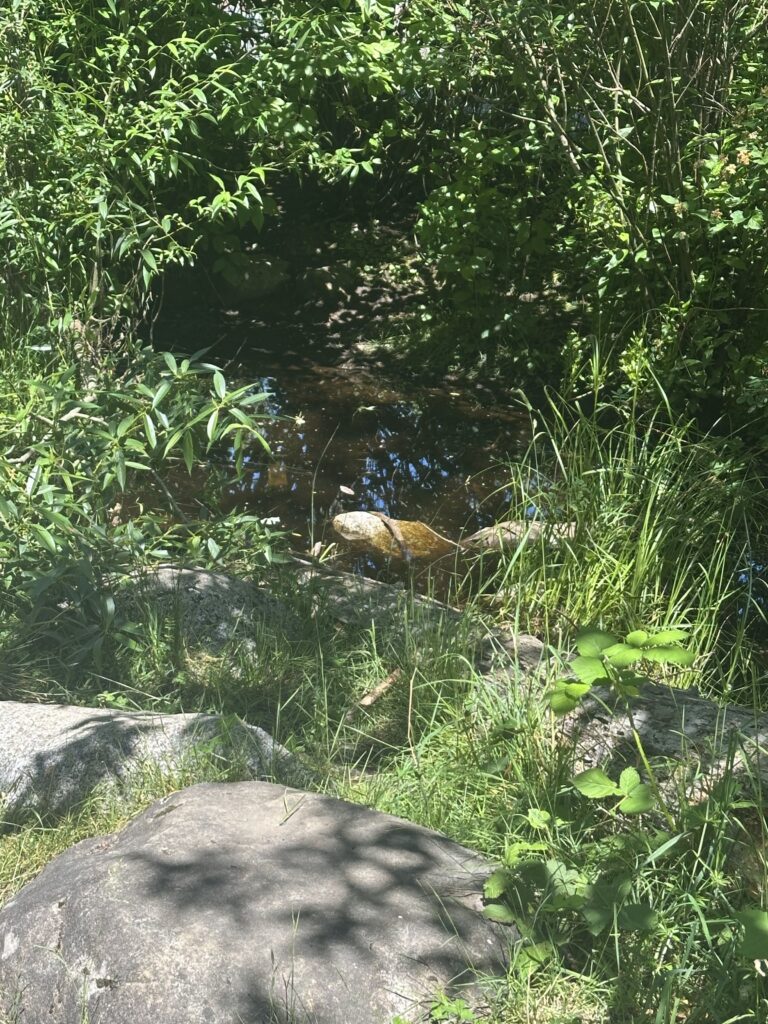
Tucked toward the back of the park, there was a small pond. Quiet, still, and a nice contrast to the basketball court I had just left. I stayed here for a few minutes, just taking it in.


The Playground

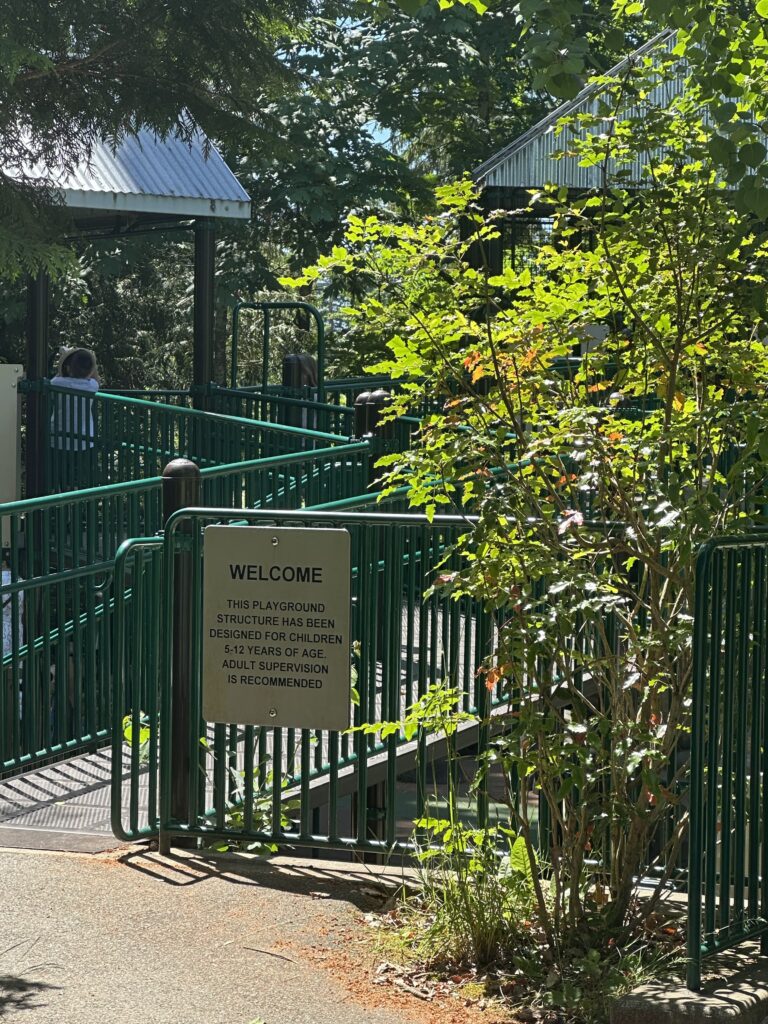
On the way back, I passed the playground. Empty in the afternoon, but it added to the feeling that this park is genuinely used and loved by the people around it. It is not just a patch of grass. It is a real community space.


Heading Home

In the last clip, I talk about heading out and what the afternoon felt like overall. It was a good time. More relaxed than I expected, more eventful than I planned, and honestly just a nice few hours outside.


How I Applied Mayer’s Principles

Modality — Instead of writing long blocks of text to describe what I saw, I let the videos carry the narration. Hearing me describe the trail while watching the footage uses both the verbal and visual channels at the same time, which is exactly what the modality principle is about. It reduces the load of reading while still delivering the same information.

Contiguity — Each photo and video is placed right next to the written description of that moment. The broken tree photo sits with the paragraph about the broken tree. The pond photo sits with the paragraph about the pond. Keeping related content together makes it easier to follow and connect.

Coherence — Everything in this post is there for a reason. I did not include every single photo I took or every moment from the afternoon. I kept the things that moved the story forward and cut anything that felt like filler. Less is more when it comes to keeping an audience engaged.

Segmenting — The story is broken into clear individual sections, one per location or moment. Rather than dumping everything into one long block, each section gives you a moment to land before moving to the next. This makes the whole thing easier to absorb without feeling overwhelmed.


Peer Feedback

A few people in my group felt the draft was solid but pointed out that Mayer’s principles section felt a bit surface-level and could go deeper with more specific examples tied to the actual media. They also suggested adding more personal reflection throughout the story rather than saving it all for the end. For the final, I made sure each Mayer principle was connected to a specific moment or media choice in the post, and I put more of my own thoughts and reactions into each section rather than just describing what I saw.


Process and Challenges

The biggest challenge was audio quality. Recording voice memos outside with wind and ambient noise is harder than it sounds. I ended up just talking directly into my phone close up rather than holding it at a distance, which helped a lot.

Editing decisions were also interesting. I had more footage than I needed and had to decide what actually added to the story versus what was just extra. The basketball moment was not in the original plan at all, but it ended up being one of the more genuine parts of the post, so I kept it.

Daily Create 4 – Video

DS106 Daily Create #tdc4435 – The 1 Take Tongue Twister

Today’s challenge was to recite a tongue twister in one take — no redos, honor system.

The twister: Luke Luck likes lakes. Sounds simple until you actually try to say it out loud fast. One take, no editing, whatever comes out is what you get.

Here’s my attempt!

https://go.screenpal.com/watch/cO1QqmnuZYW


DS106 Daily Create #tdc4970 – Make the Internet That Much Nicer

Today’s challenge was to add a little positivity to the internet. Simple enough.

The internet can be a rough place, so here’s a small reminder that you’ve got this.

https://go.screenpal.com/watch/cO1QqLnuZ3U


DS106 Daily Create #tdc5249 – Something Unusual During Your Walk?

Today’s challenge was to go on a nature walk and find something unusual to film.

I came across a new trail in a neighborhood I hadn’t explored before. Nothing dramatic — just some plants, nature, and a quiet path I didn’t know existed. Sometimes the unusual thing is just stumbling onto somewhere new and realizing how chill it is.

https://go.screenpal.com/watch/cO1QY3nuZOA

Daily Create 3 – Image

DS106 Daily Create #tdc5143 – Meaningful Object

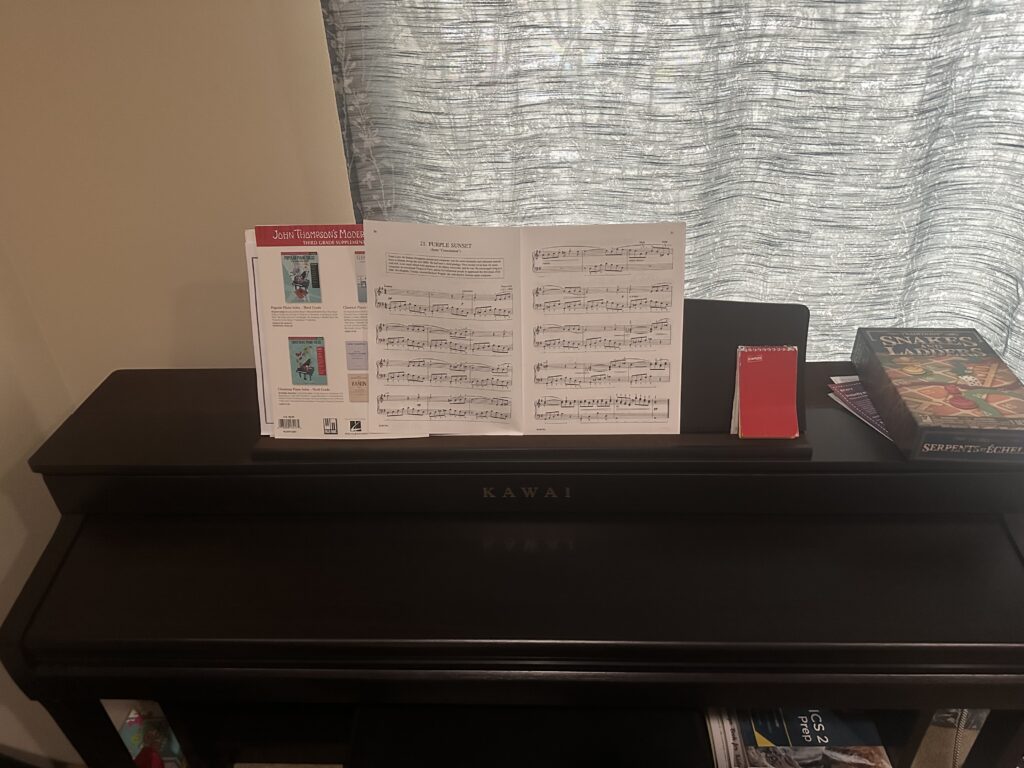
The object I chose is my piano.

It’s the one thing I keep coming back to no matter how busy life gets. I’ve performed at high school talent shows and even at Victoria’s Got Talent at UVic — but most of the time it’s not about performing, it’s just about having something that’s purely mine outside of school and work. No debugging, no deadlines, just playing.


DS106 Daily Create #tdc5148 – One Tree

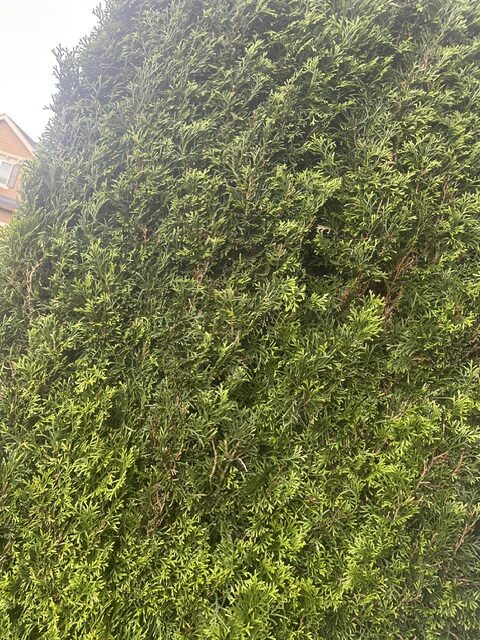
Today’s challenge was simple: find one special lone tree and photograph it.

I spotted this one and it stood out — something about a single tree on its own just looks different


DS106 Daily Create #tdc5134 – Car from an Unusual Perspective

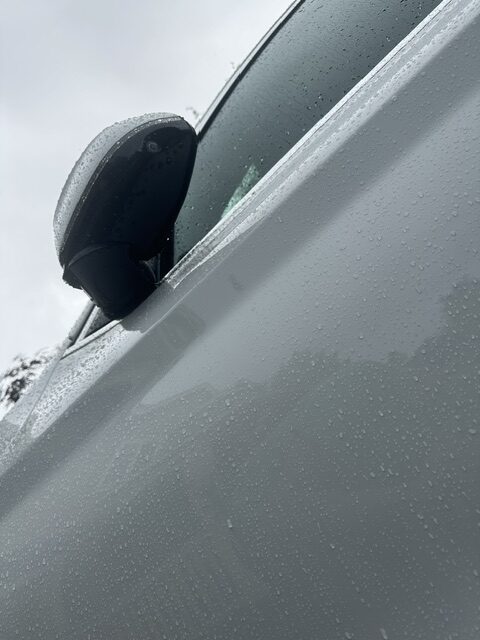
The prompt asked for a photo of your car from an unusual perspective — bonus points if your reflection shows up in the chrome.

I went low and shot straight up the side of the car on a rainy day. The water droplets covering the whole frame ended up being the best part — didn’t plan that, just good timing with the weather.


This week’s Daily Creates were all visual, which felt more natural than audio. The meaningful object prompt was the most personal as choosing my piano made sense since it exists completely outside of school and work. The lone tree shot was straightforward but made me slow down and actually look at my surroundings. The car photo was the most fun as the rain droplets were unplanned but ended up making the shot.

Daily Recreate 2 – Audio

DS106 Daily Create #tdc5142 – Pronounce This

Today’s challenge: attempt to pronounce one of the longest words in English — floccinaucinihilipilification .

The word means “the act of estimating something as worthless.” Ironic that such a long, impressive-sounding word means exactly that.

I gave it my best shot, cold, no prep, before looking up the official pronunciation.

https://voca.ro/15gGd6G6j1fE


DS106 Daily Create #tdc5123 – Poetry Reading

Today’s challenge was to find a poem you love, memorize it, and recite it.

I decided to write my own. As a CS student, I spend most of my time thinking in code, so it felt natural to write something about that experience — the frustration of a bug, the satisfaction when it finally runs.

Here’s the poem:

Lines of Code

I write in languages no one speaks aloud, Where logic blooms and errors cry out loud. A semicolon missed, the whole world breaks — But when it runs, that’s all it takes.

https://voca.ro/11u2QNApervU


DS106 Daily Create #tdc5122 – Record a Sound Related to Your Dream Jo

https://vocaroo.com/1h4tG60Vhp5U


Reflection

This week’s Daily Creates were all audio-based, which was a refreshing change. The dream job sounded fun because it forced me to show rather than tell. The poetry reading pushed me to write something original, which I wasn’t expecting. And attempting to pronounce floccinaucinihilipilification cold with no prep was fun. Working with audio made these feel more personal

Daily Recreate 1 – Text

TDC 1: The Fourth Law of Robotics

What should be the Fourth Law of Robotics?

A robot must be honest about its own limitations and uncertainties and must never present a guess as a fact or in other words, hallucinate

Asimov’s laws cover safety and obedience but say nothing about honesty. At this point, AI systems are answering questions people genuinely rely on, and if the AI confidently makes something up, it can cause real harm without technically injuring anyone.


TDC 2: When Life Gives You Sunshine

Write a poem beginning with “when life gives you sunshine”

When life gives you sunshine, just enjoy it. Stop overthinking, go outside, and be present. Someone somewhere is wishing for exactly what you have right now.

Sunshine doesn’t wait for you to be ready. Maybe that’s the point.


TDC 3: 4 Word Dystopia

Write a 4-word dystopia story.

Charged to breathe today.


Reflection

Going into text week, I thought it would be the easiest since we write every day. Turns out creating something intentional with text is actually pretty hard. The four-word dystopia challenged me the most because every word has to carry weight, which is design thinking in practice.

The sunshine poem showed me that even short writing has structure and a message which ties into storytelling. The Robotics prompt pushed me to form a real opinion, which is active learning.

Multimedia Story Draft – A Walk Through the Park – EDCI 337

For my multimedia story, I’m planning to go for a walk through a local park near Bothell, Washington. The goal is to spend at least an hour outside, slowing down and paying attention to the environment around me — sounds, textures, light, small details I’d normally walk past without thinking twice. The adventure is free, low-risk, and something I can actually enjoy.

The Plan

I’ll bring my phone for photos, short video clips, and voice memo recordings, along with a small notebook to jot things down as I go. Before the actual adventure, I’ll scout the park to identify a few interesting spots, so I’m not wandering when it’s time to record.

Shape of the Story

The tone will be personal and conversational. I want it to feel like I’m inviting someone along rather than writing a report. Drawing from what we’ve covered on storytelling, I want to use the sensory detail — the sound of gravel underfoot, light filtering through trees, the smell of grass — to make the audience feel like they’re actually there. The idea that descriptive language activates corresponding regions in the brain (Chow et al., 2014) made me think carefully about how I narrate this. I don’t just want to show a park. I want someone to feel like they walked through it.


Media Plan

I’m planning to use three media formats:

Photos — Still images capturing the environment at key moments in the story. Wide establishing shots, close-up textures, light and shadow. These will anchor the visual narrative throughout.

Short video clips — 15 to 30 second clips showing movement and atmosphere that photos can’t capture on their own. Wind in trees, sunny areas, ambient life. These will be placed at transition points in the story to maintain momentum.

Audio narration — Recorded in the moment using voice memos on my phone. I’ll narrate my thoughts as I walk, what I’m noticing, what I’m deciding, what catches my attention. Recording in the moment rather than after the fact will keep it authentic.


Connection to Mayer’s Principles

Here’s how I’m intentionally applying Mayer’s Principles of Multimedia Learning to this project:

Modality — Rather than writing long captions under every photo, I’ll pair audio narration directly with visuals. This uses both the verbal and visual processing channels at the same time, reducing cognitive load and making the story easier to follow.

Contiguity — My narration and visuals will be matched to the same moment. If I’m describing a specific tree or sound, that content will be on screen at the same time — not before or after. Keeping related content together strengthens the connection for the audience.

Coherence — Every photo, clip, and line of narration needs to earn its place. If something doesn’t move the story forward or add meaningful detail, it gets cut. No filler just because a shot looked cool.

Segmenting — The story will be divided into clear sections: arrival, exploration, and reflection. This gives the audience space to absorb each part before moving to the next rather than being overwhelmed all at once.

Signaling — I’ll use narration and written headings to guide the audience’s attention toward what matters. If something is important, I’ll call it out directly rather than hoping the viewer picks up on it themselves.


Process and Decisions

I chose a local park because it’s accessible, free, and a setting I find genuinely interesting. The challenge I’m anticipating is making something familiar feel worth watching.

The storytelling material in this module made me think about tone and emotional impact. As Maya Angelou said, people remember how you made them feel, not necessarily what you said. That’s the point I’m bringing to this. The goal isn’t just to document a walk. It’s to make someone feel like they were there with me, and take something away from it.

I’ll scout the location this week and begin gathering sample media before putting together the final structure. Challenges I expect to face include getting clean audio outdoors and making editing decisions about what to keep versus cut. I’ll document those decisions as part of my final post.

EDCI 337 – Sneh Duggal Self Introduction

Hi everyone!

My name is Sneh and I’m a 4th year Computer Science student at UVic, expected to graduate in May 2027.

My degree has pulled me towards AI and machine learning — I recently finished a co-op at the National Research Council of Canada doing AI research, which was one of the best experiences I’ve had so far. Getting to work on real research problems outside of the classroom really solidified my interest in the field.

I grew up in Seattle and moved to Victoria for university. I’ve come to really love it here — great city, great people.

Outside of school I stay pretty active. I play badminton, train jiu jitsu, and spend a lot of time with friends and family. Something most people don’t expect — I’ve been playing piano for years and performed at every high school talent show, and even played at Victoria’s Got Talent at UVic!

I don’t have much background in multimedia or educational technology, so EDCI 337 is going to be a new experience for me. I’m genuinely curious to explore how multimedia tools are used in learning and teaching, and I’m looking forward to connecting with everyone in the course!